/ 2025

Product Spotlight: Blast Exclusion Zone

Product Spotlight: Blast Exclusion Zone

Developing and adopting a site security plan for blasting operations is a mandatory practice for all operations. Mines and quarries are extremely dynamic environments, with change occurring daily. As seasons change, sites open up, and structures are built surrounding a mine or quarry, having an updated site security plan is critical. A vital component of any site secrity plan is maintaining a “crow's nest” for the BIC (blaster in charge) to safely put eyes on the site and the blast (if possible). Alongside a crow's nest, identifying exclusion zones for personnel and equipment is also needed. Safety is the name of the game when it comes to explosives, and Strayos is here to help.

Strayos has a powerful tool for improving blast safety on site: The Blast Exclusion Zone.

This tool gives users a calculated distance from a planned blast to inform personnel and equipment removal before blasting operations.  Flyrock damage to structures and equipment can be costly; however, it does not compare to personnel injury or loss. Blasting comes with many risks, this tool makes reporting blast zones easy for all users, and helps reduce some of those risks.

💡
Want to learn more about creating a safer work site? Check out our article: A Higher Look at Creating Safe Blasting Operations in Mines and Quarries.

The Blast Exclusion Zone Tool for Safer Blasting Operations

The Blast Exclusion Zone can be found in the Blast Prediction module within Strayos.
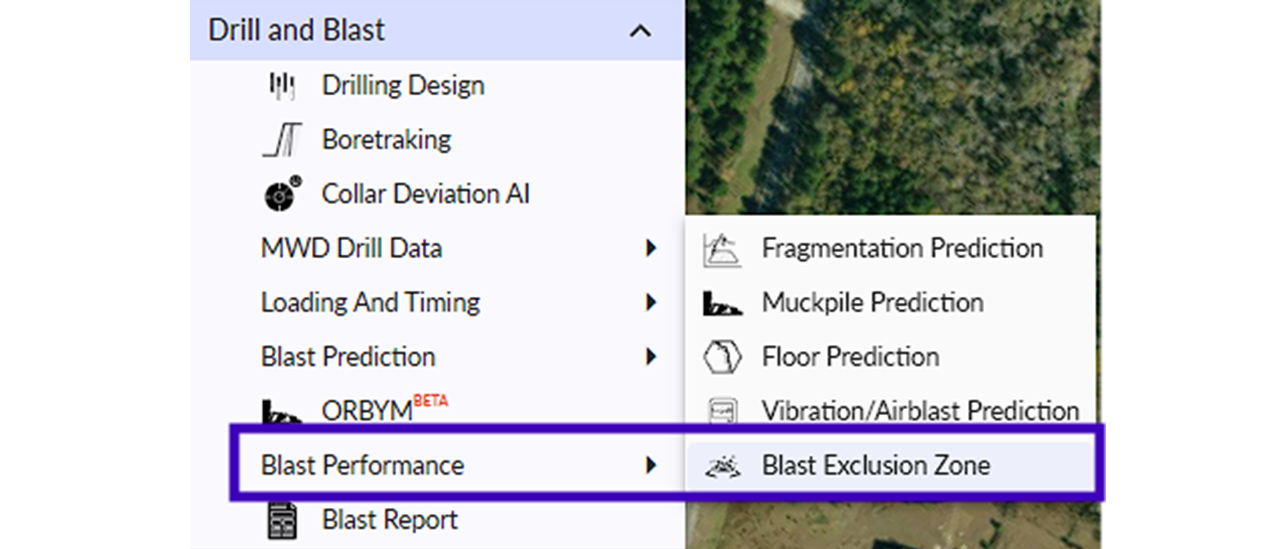
Screenshot of the Strayos Drill & Blast drop-down menu. The menu items include Drilling Design, Boretraking, Collar Deviation AI, MWD Drill Data, Loading And Timing, Blast Prediction, ORBYM (BETA), Blast Performance, and Blast Report. The "Blast Performance" option is highlighted, revealing a sub-menu with Fragmentation Prediction, Muckpile Prediction, Floor Prediction, Vibration/Airblast Prediction, and "Blast Exclusion Zone," which is also highlighted. The background is an aerial view of a forest. A caption below reads "Strayos Drill & Blast Drop Down Menu".
Strayos Drill & Blast Drop Down Menu

To use the Blast Exclusion Zone tool, you must first design a blast on a 3D model, with loading and timing data entered. We use the geolocated drill holes, design loads, and initiation times to calculate the exclusion zones. For this calculation, we use the Richard and Moore empirical model as shown below:
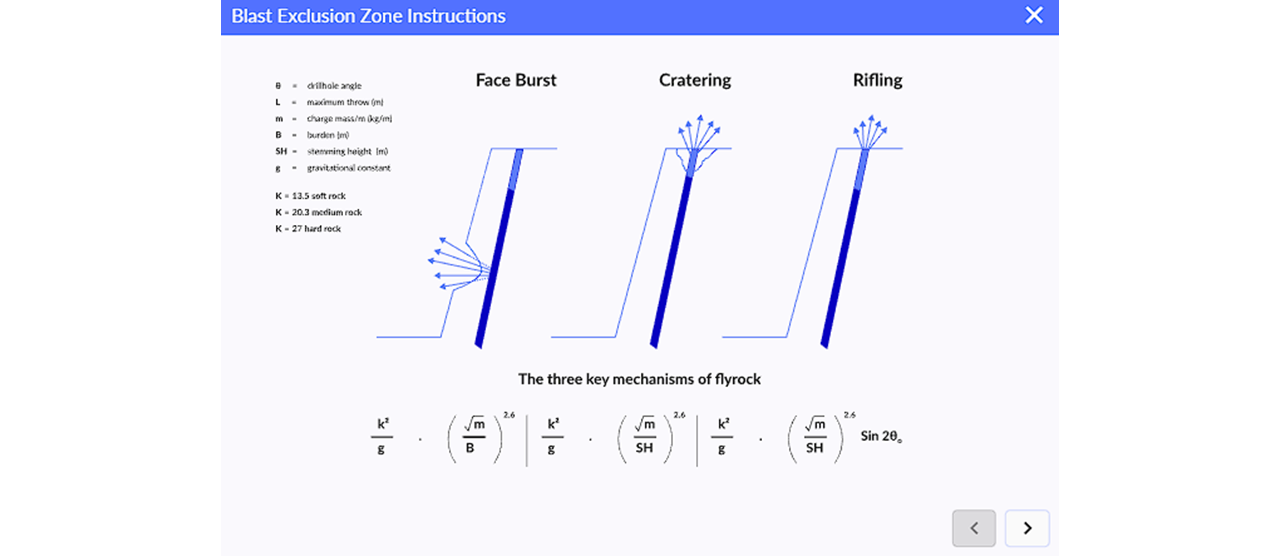
Screenshot of a popup window titled "Blast Exclusion Zone Instructions". Below the title are three diagrams illustrating "The three key mechanisms of flyrock": "Face Burst", showing rock ejection from the front face; "Cratering", showing ejection from the top surface; and "Rifling", showing ejection from the blast hole opening. To the left is a legend defining variables: θ = drillhole angle, L = maximum throw (m), m = charge mass/m (kg/m), B = burden (m), SH = stemming height (m), g = gravitational constant, K = 13.5 soft rock, K = 20.3 medium rock, K = 27 hard rock. At the bottom are three formulas: (k²/g) * (√m / B)^2.6, (k²/g) * (√m / SH)^2.6, and (k²/g) * (√m / SH)^2.6 * Sin 2θ. The window has a close button (X) in the top right and navigation arrows (< and >) in the bottom right.
Screen Shot of Strayos Blast Exclusion Zone Instructions
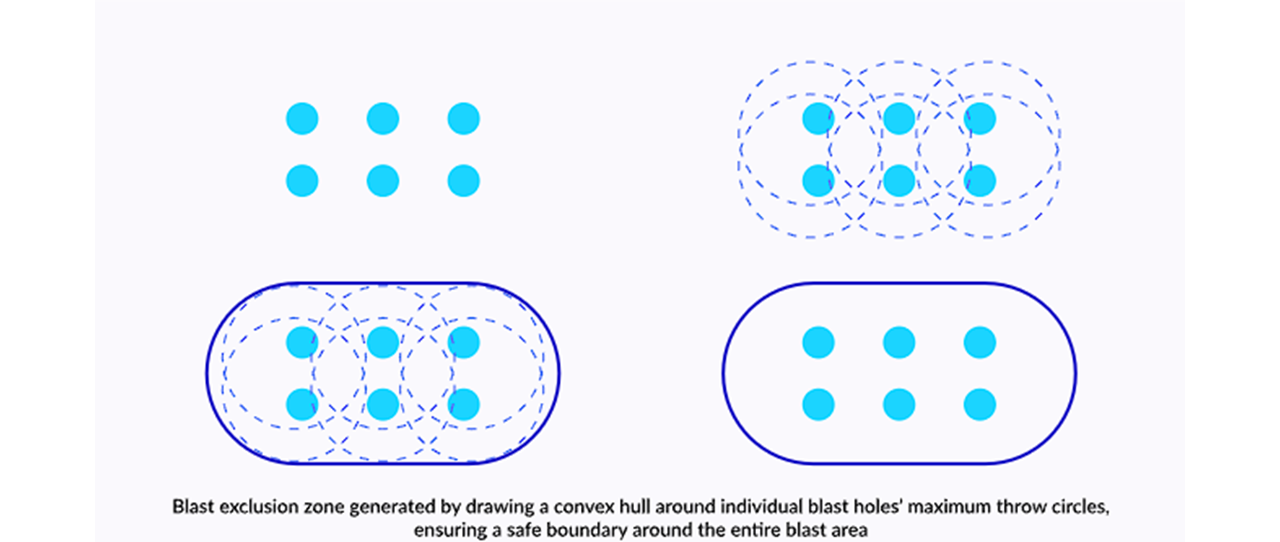
Four-panel diagram illustrating the generation of a blast exclusion zone. Top left panel shows six cyan dots arranged in two rows of three, representing individual blast holes. Top right panel shows the same six blast holes, each surrounded by a dashed blue circle representing its maximum throw area. Bottom left panel shows the blast holes and their dashed throw circles, with a solid blue line drawn around the outer perimeter of all the circles, forming a convex hull. Bottom right panel shows the final blast exclusion zone: the six blast holes contained within the solid blue convex hull boundary. Text below the diagram reads: "Blast exclusion zone generated by drawing a convex hull around individual blast holes' maximum throw circles, ensuring a safe boundary around the entire blast area."

Once the drill design is complete, users can navigate to the Blast Exclusion Zone tool. They will first be prompted to enter an Empirical Constant. This is a geological constant that represents the competency and hardness of the rock being blasted. Next, users can select their settings for calculating distances based on face holes and non-face holes. The settings shown below are toggled on by default.
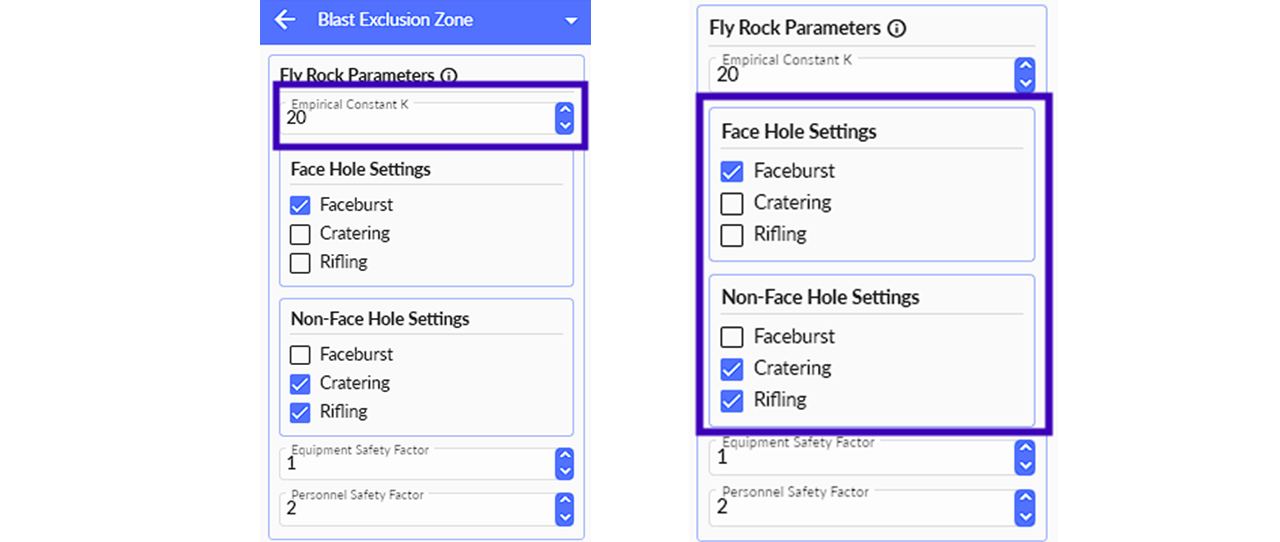
Screenshot of a software interface panel titled "Blast Exclusion Zone". The panel has a section for "Fly Rock Parameters". On the left side, the input field for "Empirical Constant K" with a value of "20" is highlighted in a purple box. Below it are "Face Hole Settings" with a checkbox for "Faceburst" selected, and "Non-Face Hole Settings" with checkboxes for "Cratering" and "Rifling" selected. Input fields for "Equipment Safety Factor" (value 1) and "Personnel Safety Factor" (value 2) are also present. The right side shows the same panel, but the purple box highlights the "Face Hole Settings" and "Non-Face Hole Settings" sections. Below the panels is a text caption: "K = 13 (Soft Rock) | K = 20 (Medium Rock) | K = 27 (Hard Rock)".
K = 13 (Soft Rock) | K = 20 (Medium Rock) | K = 27 (Hard Rock)

Lastly, an Equipment and Personnel Safety Factor can be entered for the exclusion zone. The distances will be calculated according to the user's inputs.
💡
Pro tip: This tool works great in combination with our closest structure measurement tool
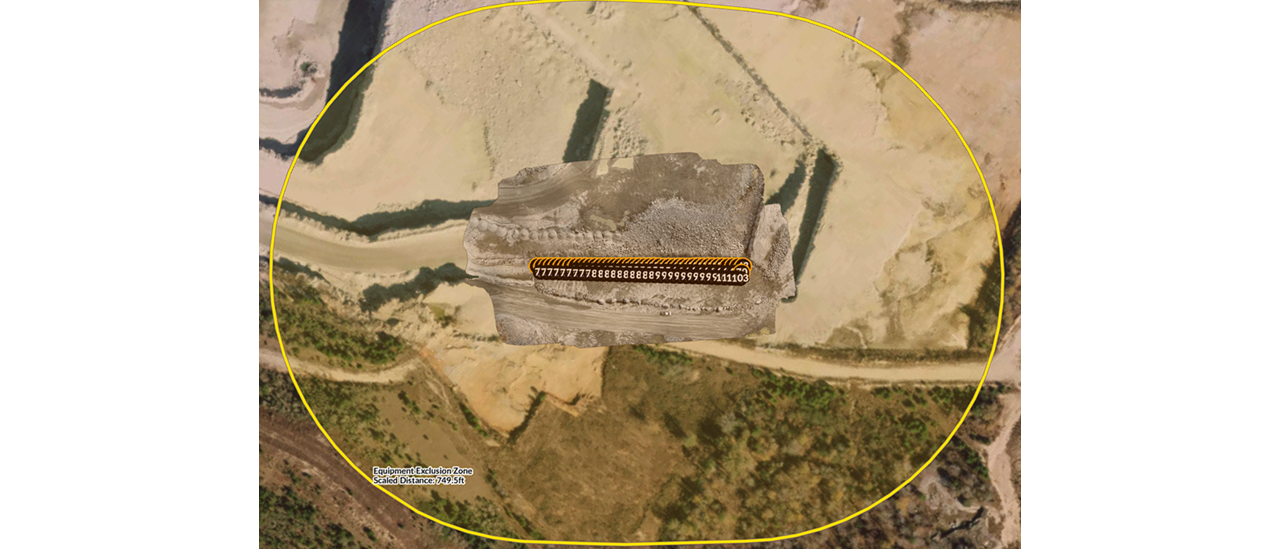
Aerial view of a quarry with a detailed 3D model of a rock face overlaid in the center. A segmented orange area with the numerical sequence "7777777778888888899999999911103" is visible on the rock face. A large yellow circle encompasses the entire scene, labeled in the bottom left as "Equipment Exclusion Zone" with a "Scaled Distance: 749.5 ft".
Aerial view of a 3D Bench Model with a Blast Design and First Level Blast Exclusion Zone

Strayos automatically produces a Blast Exclusion Zone report, which can be easily shared amongst teams and site personnel for when its  time to blast. We encourage all users to utilize this important safety tool to enhance their site security plans.

For more information, please reach out to our solutions team at info@strayos.com.

Strayos logo. Blue S made out of various sizes of dots followed by the word Strayos in black letters

Download our 2 Free E-books on AI applications for the drilling, blasting, & mining industries.

AI Guide for Drilling and Blasting

AI Guide for Mining

Check Out Other Great Videos by Strayos:

YouTube

Follow Us!

Facebook

LinkedIn

YouTube